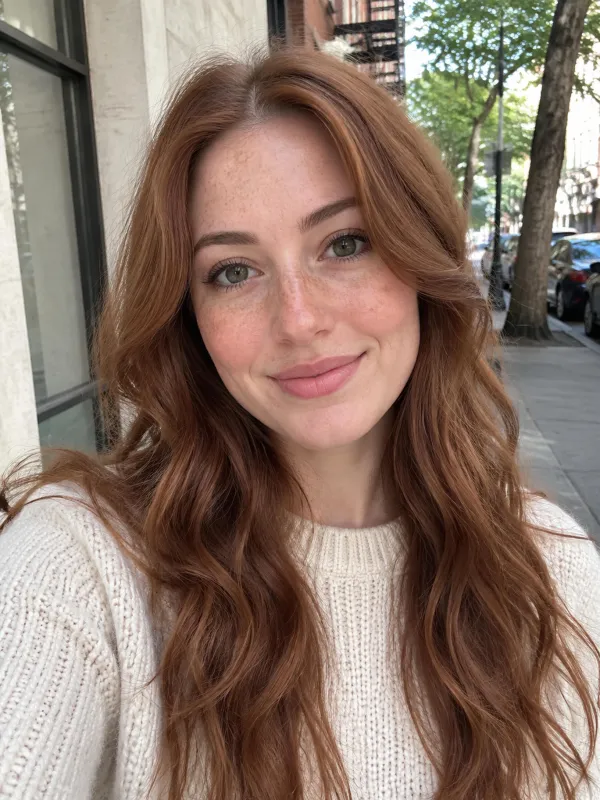
Make Photo Dance With a Single Selfie

Make photo dance clips without filming a thing. Upload one picture, or two for a duo, choose a style, and get a vertical routine set to its own music.

Dance style
Quality
Length

Upload only photos of yourself or people who agreed, and no public figures. Every dance is an imagined AI video, not real footage.

Your selfieYour dance video
Pop sample: make photo dance in one click

Dance Photo Examples

Make Photo Dance Clips From One Picture

Here is what you get when you make photo dance clips from a plain selfie. The person performs a whole routine from head to foot inside a convincing set, and the music is matched to each step. Your upload supplies the face, hair and top, while pants and shoes are added to complete the outfit. Every example below was made on this page from a selfie of a person who does not exist, with no cuts and no retouching.

Make My Photo Dance

Hip-hop · One Photo

Make Photo Dance Moves From a Cropped SelfieA cropped selfie is all you need to make photo dance on an outdoor court.

Take a selfie of a bearded man in a grey hoodie. The clip drops him on an empty basketball court at golden hour, with a skyline far behind. He keeps the hoodie and gains grey sweatpants and white sneakers, then bounces, swings his arms, lifts a knee, steps side to side and ends facing you. Nobody set up a shoot, filmed a routine or learned a step.

  • Starts from a head-and-shoulders selfie
  • Whole body moves, head to toe
  • Pants and shoes are added for you

Disco · One Photo

Make Photo Dance With Music Built InPick a style and the soundtrack comes with it.

A woman in a denim jacket and black top lands on a glowing tiled floor under a mirror ball and red lights, with flared jeans added. She points, rolls her arms, claps her hands together, points up and smiles. Pop sounds upbeat, hip-hop leans on heavy drums and bass, and disco has funky bass with bright strings. No one sings or talks, so add your favorite song in your social app after you download.

  • Instrumental music on every download
  • No vocals, speech or lip-sync
  • Replace the sound in any social app

Pop · One Photo

Make Photo Dance for 5 or 10 SecondsChoose 5 or 10 seconds, then decide how sharp you want it.

A woman with a black bob in a white hoodie becomes a 10-second pop routine in a studio, wearing light blue jeans and white sneakers. She swings her arms, steps sideways, hops and ends with one arm above her head. Pick 5 seconds for a quick loop or 10 for more moves. At 480p that costs 50 or 80 credits, and at 720p it costs 90 or 170. Every clip is vertical 9:16, sized for phone feeds.

  • Choose 5 or 10 seconds
  • Vertical 9:16 for phone feeds
  • Starts at 50 credits for 480p

Pop · Two Photos

Make Photo Dance as a DuoPair two separate pictures in one routine.

Use one photo of a man in a navy T-shirt and another of a woman in a green blouse. The studio clip places him on the left and her on the right, both in light jeans and white sneakers. They share arm moves, side steps and shoulder turns, and each keeps their own face. A duo costs the same as a solo clip. The two pictures never needed to be taken together, so friends in different cities can still dance side by side.

  • A second dancer adds no cost
  • Each person keeps their own face
  • Photos do not need to match

Hip-hop · Two Photos

Make Photo Dance Clips for the Group ChatDrop friends and family into a routine they never rehearsed.

Picture an older woman in a blue cardigan beside a young man in a plaid shirt, bouncing through a hip-hop beat on a golden-hour court. They finish side by side, which makes a funny mom-and-son clip for the group chat. Partners, parents and friends all work, as long as they said yes. This is not a copy of any trending dance or a ready-made template. It is a new routine starring the faces you upload.

  • Fun clips for friends and family
  • Original routines, not templates
  • Easy to send to group chats

Photo Guide

Best Photos to Make Photo Dance RightA few small choices help you make photo dance clips that look right the first time.

Use This

  • One person per picture, face fully visible and turned toward the camera.
  • Even, bright light across the face with natural skin tone.
  • A selfie or head-and-shoulders shot. You do not need a full-body photo.
  • Two separate portraits when you want a duo.

Skip This

  • Group shots. Crop down to one face before uploading.
  • Dark sunglasses, masks or a hand covering the chin.
  • Heavy filters, blurry frames or dim night shots.
  • Public figures, or anyone who has not given permission.
Make My Photo Dance

Behind the Dance

What Powers Each Routine

To make photo dance clips that follow real choreography, this page runs on MiniMax H3, the only model here, so there is nothing to choose. It copies a reference routine move for move and returns the video with music attached. In our tests it followed the routine every time, though the result remains an imagined AI render.

Make Photo Dance in Full Routines

Each style starts from a reference dance we made ourselves with AI, using a dancer who does not exist and a still camera. The model copies the timing and steps, and puts the person from your photo in the dancer's place.

Keeps Your Look

Faces, hairstyles and tops stay close to your upload, though small details in an imagined render can shift a little.

Music Already Synced

Each download carries the style's instrumental track, with no singing and no spoken words.

Three Steps

How to Make Photo Dance in Three Steps

Make My Photo Dance

01

Add Photos to Make Photo Dance

Upload a clear selfie as Photo 1. Add a second portrait if you want two dancers.

02

Choose Style and Quality

Pick pop, hip-hop or disco, then 5 or 10 seconds and 480p or 720p. The button shows the exact credit price before you generate.

03

Generate and Share

Start the render and keep your tab open. When it finishes, download the vertical video and post it.

Credit Plans to Make Photo Dance Clips

Choose a monthly credit subscription or buy a one-time video pack when you want to render a quick goal. Every package includes full 768p downloads with no watermark.

Save 30% billed annually

Flexible monthly subscription.

Mini Monthly

The lowest price to get started. Every model, a monthly budget to try things out.

$7.99/mo

Renews monthly, cancel anytime.

200 credits

≈ 0–10 videos, depending on length

≈ 14–66 images, depending on the model

4.00¢ / credit

  • 9:16 · 768p · MP4 with crowd sound
  • Credits reset every billing month
  • Access to all models
  • Watermark-free outputs
  • Buy an add-on credit pack
  • Standard support

Lite Monthly

The cheapest way to start. Every model, a small monthly budget.

$12.99/mo

Renews monthly, cancel anytime.

400 credits

≈ 1–20 videos, depending on length

≈ 28–133 images, depending on the model

3.25¢ / credit

  • 9:16 · 768p · MP4 with crowd sound
  • Credits reset every billing month
  • Access to all models
  • Watermark-free outputs
  • Buy an add-on credit pack
  • Standard support

Starter Monthly

Monthly credits for casual creation and squad banter.

$29.9/mo

Renews monthly, cancel anytime.

1,000 credits

≈ 3–50 videos, depending on length

≈ 71–333 images, depending on the model

2.99¢ / credit

2 parallel tasks

  • 9:16 · 768p · MP4 with crowd sound
  • Credits reset every billing month
  • Access to all models
  • Watermark-free outputs
  • Buy an add-on credit pack
  • Standard support

Standard Monthly

Popular

Monthly credits for creators posting frequent vertical clips.

$49.9/mo

Renews monthly, cancel anytime.

2,000 credits

≈ 6–100 videos, depending on length

≈ 142–666 images, depending on the model

2.50¢ / credit

3 parallel tasks

  • 9:16 · 768p · MP4 with crowd sound
  • Credits reset every billing month
  • Access to all models
  • Watermark-free outputs
  • Buy an add-on credit pack
  • Priority support

Advanced Monthly

Heavy-volume monthly tier built for active creators and team accounts.

$89.9/mo

Renews monthly, cancel anytime.

5,000 credits

≈ 15–250 videos, depending on length

≈ 357–1666 images, depending on the model

1.80¢ / credit

5 parallel tasks

  • 9:16 · 768p · MP4 with crowd sound
  • Credits reset every billing month
  • Access to all models
  • Watermark-free outputs
  • Buy an add-on credit pack
  • Priority support

Make Photo Dance: Questions and Answers

What to know before you make your first clip.

Make My Photo Dance
How do I make photo dance clips from a selfie?

Start with a bright selfie in the first slot. Add a second portrait if you want two dancers, then choose pop, hip-hop or disco, a length of 5 or 10 seconds, and 480p or 720p. Press generate and wait. Renders took anywhere from under a minute to roughly four, and the vertical MP4 appears when it is done. To make photo dance results look their best, face the camera in good light.

How much does it cost to make photo dance videos?

Prices depend on length and quality. Five seconds costs 50 credits at 480p or 90 at 720p, and ten seconds costs 80 at 480p or 170 at 720p. Signing in is required to generate. The first plan that covers a video is $7.99 a month for 200 credits, which pays for four short 480p clips, and the button states the exact price before you commit.

Does the dance clip come with music?

Yes. Every clip you make here carries the instrumental that belongs to the style you chose, be it pop, hip-hop or disco, with no lyrics and no speech. Uploading your own song is not possible on this page. For a particular track, replace the audio in TikTok, Instagram or any video editor once the file is saved.

Will the dancer actually look like me?

Mostly, yes. Across our tests the face, hair and top stayed near to your upload, and in duo clips the two dancers never traded places. The AI invents the pants and shoes. Since the result is an imagined render, not filmed footage, small details can drift. A bright, forward-facing selfie gives the nearest match when you make photo dance videos of yourself.

Can I make a friend or family member dance?

Yes, but only with their permission. Never upload photos of celebrities, public figures or anyone who did not agree to be animated. Also note that videos made without an active paid subscription can appear in our public Explore feed, so tell them before you make photo dance clips starring them and share the result.

What kind of photo works best?

Pick one person looking forward in good light with nothing covering the face. A selfie or head-and-shoulders portrait is plenty, and a full-body shot is unnecessary. Group photos, sunglasses, masks, dim rooms and heavy beauty filters all make it harder to make photo dance results that resemble the person.

Can I use a pet photo?

This tool was built and tested on photos of people only. We have not tested pets, so we cannot say how a dog or cat will turn out. For the best outcome when you make photo dance clips, stick to portraits of people who have agreed to appear.

Which model does the dance generator use?

Every clip runs on MiniMax H3, so there is no model picker to manage. It follows our reference choreography move for move and returns the video with instrumental music synced in. If you are ready to try it, head back to the homepage and start from there.

Keep Exploring

More From OzilGoalAI

Make Photo DanceWith One Selfie

Make photo dance clips: upload a picture, choose a style, and get a vertical dance clip with music, ready to post.

Make My Photo Dance

FROM 50 CREDITS · NO PROMPT NEEDED

Make Photo Dance

Make My Photo Dance